
Good Dog: Find Your Puppy
Good Dog, Inc.Lifestyle
4.7581.00 Reviews
- Version
- 3.7.0
- Installs
- 100.00K
- Age Rating
- Everyone
Screenshots

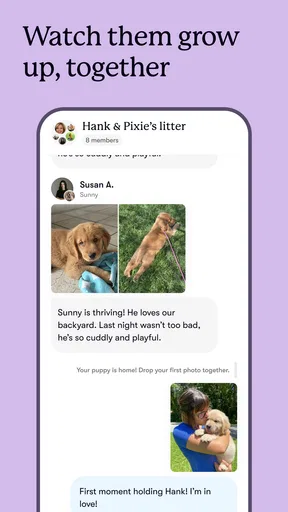
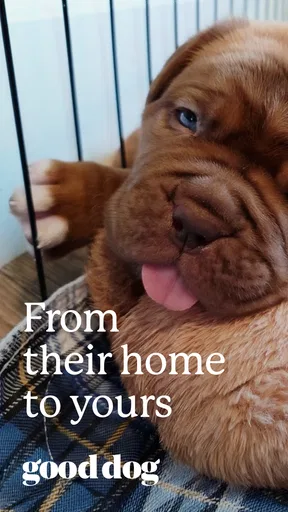
Our Review of Good Dog: Find Your Puppy
 Analysis by Appyee
Finding a puppy is exciting, but the search can also become confusing very quickly. Listings, breeder conversations, questions about timing, and the emotional pull of a particular dog all compete for attention. I spent time with Good Dog: Find Your Puppy to see whether it makes that process easier, especially when I was using it on a phone and relying on a live internet connection. My overall impression is that it works best as a focused starting point for people who want to work with trusted breeders rather than browse randomly across the web.
Good Dog is a free lifestyle app from Good Dog, Inc., available for users aged Everyone. It is designed around connecting prospective dog owners with breeders, so its value is less about entertainment and more about helping organize an important personal decision. The app has built a strong audience, with a 4.7 average from around 6.7 thousand ratings and more than 100 thousand installs. Those figures suggest that many people find the basic idea useful, although they should not replace your own checks before committing to a puppy.
How Good Dog feels when the connection is doing the work
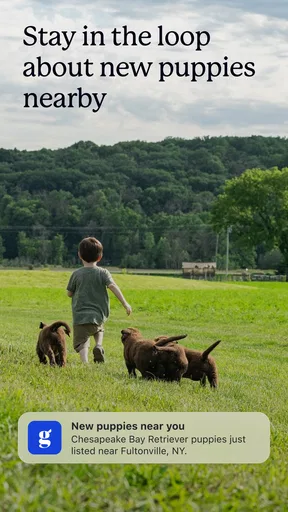
The most important thing to understand is that this is a connected browsing and communication experience. The useful parts depend on current information: available puppies, breeder details, conversations, and any changes that happen while you are searching. When the network is stable, the app feels much more practical than keeping several browser tabs open and trying to remember which breeder said what.
I found the live nature of the experience helpful because puppy searches change quickly. A dog that catches your eye may no longer be available later, while another breeder may become a better match after you read more carefully. That makes Good Dog more useful as an active search tool than as a static directory. I would open it when I had time to compare options, then return later to continue the process rather than treating it like a one-time lookup.
There is also a psychological advantage to having the search in a dedicated app. General web searches often lead to a mixture of breeder pages, social posts, classified listings, and articles. Good Dog keeps the purpose narrower. That does not remove the need for careful research, but it reduces the feeling that you are starting from an unfiltered pile of results.
The trade-off is that a connected app can feel less dependable when the signal is weak. If I were traveling, inside a building with poor reception, or switching between Wi-Fi and mobile data, I would not want to rely on the app as my only record of an important conversation. The sensible approach is to use it when the connection is reliable and keep essential contact details or notes somewhere else when a decision is already underway.
Why the breeder-focused approach matters
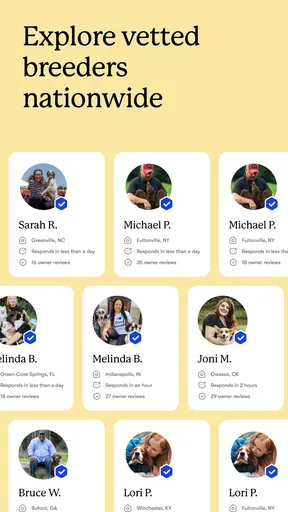
The app’s central promise is not simply “find a cute puppy.” It is about working with trusted breeders, which changes how I evaluate it. The useful question becomes whether the app helps me make a more deliberate choice, not whether it shows the largest possible number of dogs. That distinction matters because a puppy search should include questions about the breeder, the dog’s needs, the expected timing, and whether the household is genuinely prepared.
I would use the app to create a shortlist rather than immediately contact every appealing listing. First, I would note the breeds or mixes that fit my lifestyle, then compare breeder information and availability. After that, I would prepare the same core questions for each conversation. This makes differences easier to spot and reduces the chance that excitement will push practical concerns into the background.
One useful habit is to separate “I like this puppy” from “this situation works for me.” A listing can be attractive while the timing, location, care requirements, or breeder communication do not fit. Good Dog helps initiate the search, but the quality of the final decision still depends on the work I do outside the first impression.
Using it in ordinary mobile situations
The phone format suits the moments when people actually search for a puppy. I could imagine checking the app during a lunch break, saving a few possibilities mentally, and returning home later to discuss them with family. It is also convenient when a friend sends a recommendation and I want to compare that lead with other options without opening a full desktop setup.
However, mobile convenience can encourage rushed decisions. A small screen makes it easy to skim photos and headlines while missing details that deserve slower attention. I would avoid making a commitment while standing in a queue or multitasking. Instead, I would use those short sessions for discovery and reserve a quiet period for reading carefully and writing questions.
A realistic example would be a couple living in an apartment who wants a dog but has not agreed on breed, size, or timing. One person could browse during a commute, but the better workflow would be to make a shared shortlist later, check whether each option fits their daily routine, and then contact only breeders who remain suitable. The app can support that process, but it cannot make the household decision for them.
Another mobile situation is checking a conversation while away from home. That can be useful if a breeder responds and I need to keep the discussion moving. At the same time, I would be cautious about replying too quickly to an important question. A short, thoughtful response is better than an impulsive promise made because a notification appeared at an inconvenient moment.
What happens when the connection fails
Connectivity problems are not just a technical annoyance here. They can interrupt the exact moments when information is changing. A page may take longer to load, a conversation may not appear immediately, or I may be unsure whether an action completed. In that situation, repeatedly tapping can create more uncertainty rather than solving it.
My preferred recovery routine would be simple: pause, check whether the phone has a stable connection, reopen the relevant screen, and confirm what actually happened before sending anything again. That is especially important in communication, where duplicate messages can look careless or create confusion. I would also avoid assuming that a missing screen means a breeder has disappeared or that a puppy is no longer available.
The app is therefore easier to use when I treat it as one part of a larger process. I would keep a short note with breeder names, the date of my last conversation, the questions I still need answered, and any important follow-up. This is not glamorous, but it is one of the best ways to recover after an interrupted session. It also prevents the familiar problem of opening several listings and forgetting which details belonged to which breeder.
There is a second kind of failure to consider: a mismatch between expectations and reality. Even if the app works perfectly, a breeder may not be the right fit, a puppy may no longer be available, or the timing may change. I appreciate Good Dog more when I use it as a way to discover and evaluate possibilities rather than as a guarantee that the first promising option will work out.
Making the search less wasteful on mobile data
Because the experience involves browsing visual and current information, I would be mindful of when and how I use it on a mobile connection. If I were comparing many possibilities, I would do the longer session on dependable Wi-Fi and use mobile data for targeted checks. That keeps casual browsing from turning into an unexpectedly long phone session.
I would also avoid repeatedly refreshing the same page simply because I am eager for an answer. Refreshing does not improve the quality of a decision, and it can make a weak connection feel worse. A better method is to write down what I already know, identify the single missing detail that matters most, and return later when I can review it properly.
Data-conscious use also means being selective about conversations. Instead of sending a string of separate messages, I would group my questions into a clear, respectful note. That is easier for the breeder to answer and easier for me to review later. It also creates a more useful record of the discussion than scattered one-line replies.
My strongest practical tip is to build a comparison note outside the app while browsing. I would include the breed or type of dog, the breeder’s name, the questions answered, the points that need verification, and my household’s concerns. This turns Good Dog from a stream of appealing listings into a decision-making tool. It is a small extra step, but it protects against the emotional bias that comes from judging each option in isolation.
Where it beats ordinary alternatives
The usual alternative is a broad web search. That can offer more variety, but it also requires more effort to judge the quality and relevance of every result. Good Dog’s narrower purpose is its advantage: I can begin with a breeder-oriented environment instead of sorting through unrelated pages and advertisements.
Another alternative is relying entirely on personal recommendations. Friends and family can provide valuable context, especially about temperament and care, but their experience may be limited to one breed or one local area. Good Dog can widen the initial search while leaving room for those personal opinions to influence the final choice.
Social media is useful for seeing updates and community discussion, yet it can encourage decisions based heavily on images and popularity. I prefer the more deliberate rhythm of using Good Dog for discovery, then doing independent checks and having a detailed conversation before moving forward. The app is not a substitute for judgment; it is a way to make the first stage less chaotic.
That comparison also clarifies who should skip it. If I already have a breeder recommended by someone I trust and only need to arrange a visit, the app may add little. It is also not the right tool for someone expecting a quick purchase with minimal questions. The breeder-focused approach rewards patience, comparison, and follow-up, so people unwilling to spend time on those steps may find it slower than a general marketplace.
Questions I would answer before contacting anyone
Before sending a message, I would decide what kind of home I can offer. How much exercise can I provide on an ordinary weekday? Who will handle training? What happens during travel or long workdays? These questions prevent me from choosing based only on appearance or breed preference.
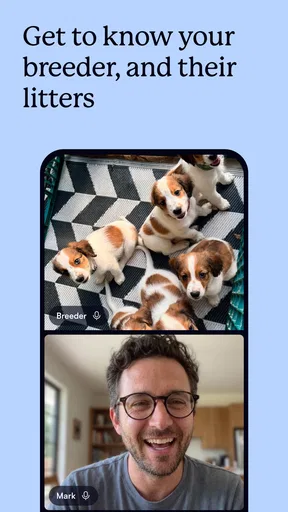
I would also prepare questions that reveal how clearly the breeder communicates. I would want to understand the puppy’s expected timing, the care involved, and what responsibilities come with bringing the dog home. I would pay attention not only to the answers but also to whether the conversation feels open and specific. A polished listing is not enough on its own.
For families, I would discuss allergies, children, existing pets, and household rules before opening the app. That makes the search more focused and avoids arguing over individual puppies without agreeing on the practical foundation first. For first-time owners, I would be especially careful not to confuse a lower-friction search with a lower-responsibility commitment.
Good Dog can help me reach the right conversation, but it cannot independently inspect my home, measure my readiness, or predict how a particular dog will fit into my routine. That is why I see the app as an organized doorway rather than the whole process.
Version, accessibility, and everyday practicality
The current version is 3.7.0, and the app supports Android 8.0 or newer. That makes it approachable for people who are not using the newest phone, although the experience will still depend on the device’s general performance and connection quality. Since it is free, trying it as an initial search tool does not require a purchase decision.
The Everyone content rating also makes the app broadly suitable from an age-classification perspective. In practice, I would still encourage younger users to involve a parent or guardian because choosing a puppy involves money, care, time, and long-term responsibility. A simple interface or accessible search does not change those real-world obligations.
I would not install it expecting a complete pet-care system, a replacement for professional advice, or an offline research library. Its clearest role is helping people find and communicate with breeders in a more focused setting. That focused role is valuable, but only when it matches what I need at that stage.
My connectivity verdict
Good Dog works best when I have a stable connection, enough time to read carefully, and a clear plan for comparing breeders. Its mobile design makes it convenient to begin a search in everyday situations, while the breeder-centered approach gives that search more direction than a random web browse. The main weakness is not that it lacks excitement; it is that connected browsing can tempt users to move too quickly or depend on the app as their only record.
I would recommend it to someone starting a puppy search who wants a more structured way to find breeders and begin conversations. I would use it alongside personal research, written notes, and direct questions, not instead of them. If your connection is unreliable, wait for a better moment before handling important messages, and keep your key information organized elsewhere.
After using it, my view is straightforward: Good Dog is most useful as a careful first step, not a shortcut to ownership. It can reduce the noise around finding a puppy and help turn browsing into a more intentional conversation. For that purpose, the free app from Good Dog, Inc. is worth trying, provided you remain patient, verify what matters, and remember that the right match depends on far more than a convenient mobile search.
Verdict
Strengths of Good Dog: Find Your Puppy
- Detailed breed profiles help match puppies to your lifestyle.
- Search filters make it easier to narrow down suitable puppy listings.
- Adoption and breeder resources support more informed decisions.
- The interface is simple to browse on both phones and tablets.
- Saved listings let you keep track of puppies you may like.
Limitations of Good Dog: Find Your Puppy
- Puppy availability and listings can vary significantly by location.
- Some listings may require contacting sellers outside the app.
- Profiles may not always include complete health documentation.
- The app cannot guarantee breeder quality or puppy welfare.
- Notifications may feel limited if few matching puppies are available.
Similar Picks in This Category
View All
SmartThings
Samsung Electronics Co., Ltd.4.6

Google Home
Google LLC4.0

Pinterest4.2

Astrotalk - Talk to Astrologer
Astrology & Horoscope4.7

My Verizon
Verizon Consumer Group4.5

Samsung Wallet (Samsung Pay)
Samsung Electronics Co., Ltd.4.1
Frequently Asked Questions
What is Good Dog: Find Your Puppy?
Good Dog: Find Your Puppy is an app designed to help people discover dogs and puppies that may be available for adoption or purchase through listed breeders, shelters, or other providers. It can make searching easier by allowing users to browse profiles, review basic information, and compare potential matches. Availability, listings, and contact options may vary depending on location and the organizations using the platform.
Can I adopt a puppy directly through Good Dog?
The app may help you find puppies, dogs, breeders, and rescue organizations, but it does not necessarily complete every adoption directly inside the application. In many cases, you will need to contact the listed provider, ask questions, review its policies, and complete an application or screening process. Always confirm ownership, health records, fees, and adoption requirements before making arrangements.
Is Good Dog safe to use when searching for a puppy?
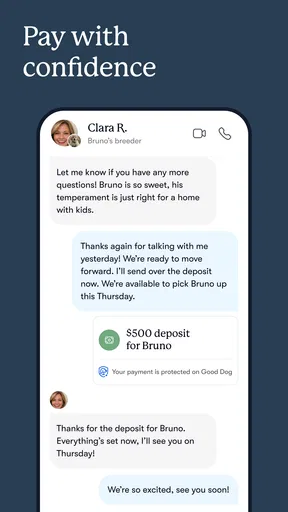
Good Dog can provide useful information and may include profiles or verification details for some providers, but users should still perform their own checks. Read reviews, request veterinary and vaccination records, verify the provider’s identity, and avoid sending money through unusual payment methods. Never rely solely on photographs or app listings, especially when a deal seems unusually cheap or urgent.
Does Good Dog offer health information or guarantees for puppies?
Puppy profiles may include details such as breed, age, location, health testing, vaccinations, and breeder or rescue information, although the amount of information can differ between listings. These details should be treated as information to verify rather than an automatic guarantee. Ask for official records, understand any health agreement, and consult a veterinarian before finalizing your decision.
Is Good Dog free to download, and are there additional costs?
The application may be free to download, but finding a puppy can involve costs that are separate from the app itself. Depending on the listing, you may encounter adoption or purchase fees, deposits, transportation charges, supplies, veterinary expenses, and possible service-related fees. Review the provider’s terms carefully, confirm the complete price in writing, and avoid paying before verifying the listing.
